> ## Documentation Index
> Fetch the complete documentation index at: https://docs.martiallogic.com/llms.txt
> Use this file to discover all available pages before exploring further.
# Reception SOP
> Welcome to the Reception Standard Operating Procedures (SOP). This page explains what to check each day and how to keep our front desk running smoothly.
# Daily Tasks
Before classes start, **look in the Airtable Calendar** for any new trial bookings.
Before a new student comes in, you should already know:
* The names of new students (and parents, if listed)
* Whether they have completed their waiver form
This helps them feel expected and welcome, and shows we’re organised and professional.
If you skip this step and make everyone fill out a walk-in form, a trial student might will get pitched twice - this feels awkward and unprofessional.
If you see someone you **don’t recognise**, **ask their name immediately**.
Don’t assume they’re signed up - even if they’ve been training for a few weeks.
For anyone you’re unsure about, check that they’re in Airtable (specifically in the CRM tab).
If someone is training but not listed in Airtable, it means they haven’t fully completed their sign-up form.
This usually means they’re missing payment details or a waiver - both are big issues.
Ask them to either:
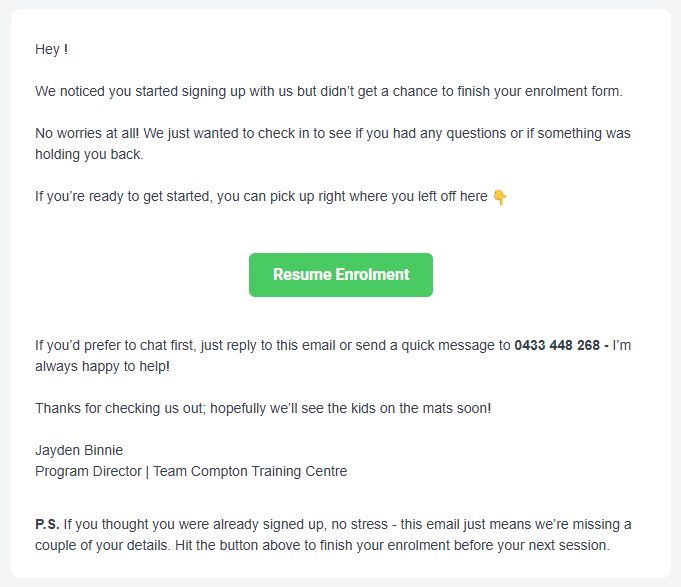
**1) Complete their sign-up** (they should have received an [email prompting them to finish it](#member-not-in-airtable)), or
**2) Redo their sign-up** completely on the gym iPad or their phone, and show you once it’s done.
Do not allow anyone to train without being properly enrolled in Airtable.
Atleast once a week, look over the “Churned Members” list in Airtable.
This helps you catch anyone who cancelled but is still showing up to train.
We’ve seen people cancel and keep training - this stops that from happening.
# What To Do If?
If a student is in Airtable but didn’t show up for their trial:
**Tell Jayden in Facebook group chat ASAP.**
They **must send an email** to request this.
No exceptions.
**Do not accept:**
Text messages
Instagram or Facebook messages
Verbal requests in the gym
Parents asking through their kids
**Pausing or cancelling without an email can cause serious problems, including:**
Members thinking they can ignore the sign-up agreement
Missed or incorrect billing
Lost churn data (we can’t track cancellations properly)
Missed exit surveys (we lose valuable feedback)
Anyone under 18 cannot sign themselves up.
Their parent or guardian - the person paying for the membership - must complete the sign-up.
This rule protects us from issues like:
* Failed payments or chargebacks
* Legal complications with underage students signing waivers and agreements
**Absolutely not allowed under any circumstance.**
Ask Jayden for further explanation.
There are only two reasons someone might be training but not found in Airtable:
3. They started signing up but got distracted before finishing the form.
4. They are intentionally avoiding signing up (to skip payment or avoid filling in details).
Anyone who starts our sign-up form and doesn’t finish will automatically get an email from us.\
This email goes out 15 minutes after they abandon the form and again 2 days later.\
It asks them to complete their enrolment.
There’s a small chance that our email could end up in their spam or junk folder - remind them to check.
With this follow-up system in place, most people who still aren’t in Airtable are probably intentionally avoiding signing up.
Ask them to do one of the following:
**1) Complete their sign-up** from the email they received (if they already started the process), or
**2) Redo their sign-up** completely on the gym iPad or their phone, and show you once it’s done.
Do not allow anyone to train until they are fully enrolled in Airtable.
Do not negotiate prices.
You teach your members how to treat you.
Offering discounts or casual deals sets a precedent that we are:
* Desperate for business
* Willing to bend rules
* Not enforcing our own policies
* Unprofessional
* Allowing members to dictate terms
It is your responsibility to teach members how to treat you.
We never offer discounts on memberships; except for families signing up three or more children.
See [**Operations → Updating Member Details**](Operations/updating-member-details) for full instructions.
*(They Are Not Booked in Airtable)*
Ask them to complete a Walk-In Form before doing anything else.
# Customer Journey
```mermaid theme={null}
flowchart TB
%% Entry point
A["Trial Walks In
Greet them within a few seconds.
No one likes standing around unsure what to do."]
%% Check AirTable
B["Are they booked in AirTable?"]
A --> B
%% Not in AirTable
B -->|No| C["GET THEM TO DO A WALK-IN
TRIAL FORM
(Trial not in calendar)"]
%% Booked in AirTable
B -->|Yes| D["Do they have a waiver?"]
%% Waiver logic
D -->|No| E["Tell them to click the link
in their email or SMS.
If they can’t find it,
just get them to do a walk-in form."]
D -->|Yes| F["AWESOME → THEY ARE
GOOD TO TRIAL"]
%% Trial happens
C --> F
E --> F
F --> G["TRIAL FINISHES"]
%% Fit evaluation
G --> H["ARE THEY A GOOD FIT?"]
H -->|Yes| I["Follow the Sales Script
from our sales page"]
H -->|No| J["Tell Jayden immediately
so he can contact them
and let them know it’s
not a good fit"]
%% Prospect reactions (extra section)
I --> K["PROSPECT IS KEEN TO SIGN UP STRAIGHT AWAY"]
I --> L["PROSPECT SEEMS DEFENSIVE OR DEFLECTS"]
K --> M["Either way they’ll receive
our 'Sign-Up Offer' email"]
L --> M
```