
Daily Tasks
1
Check Airtable for Any New Trials Today
Before classes start, look in the Airtable Calendar for any new trial bookings.Before a new student comes in, you should already know:
- The names of new students (and parents, if listed)
- Whether they have completed their waiver form
2
Confirm New People Are Enrolled in Airtable
If you see someone you don’t recognise, ask their name immediately.Don’t assume they’re signed up - even if they’ve been training for a few weeks.For anyone you’re unsure about, check that they’re in Airtable (specifically in the CRM tab).If someone is training but not listed in Airtable, it means they haven’t fully completed their sign-up form.This usually means they’re missing payment details or a waiver - both are big issues.Ask them to either:1) Complete their sign-up (they should have received an email prompting them to finish it), or2) Redo their sign-up completely on the gym iPad or their phone, and show you once it’s done.
3
Check Recently Churned Members
Atleast once a week, look over the “Churned Members” list in Airtable.This helps you catch anyone who cancelled but is still showing up to train.We’ve seen people cancel and keep training - this stops that from happening.
What To Do If?
Trialist Is in Airtable - But They No-Showed
Trialist Is in Airtable - But They No-Showed
If a student is in Airtable but didn’t show up for their trial:Tell Jayden in Facebook group chat ASAP.
A Member Wants to Cancel, Pause, or Make Changes to Their Billing
A Member Wants to Cancel, Pause, or Make Changes to Their Billing
They must send an email to request this.
A Teenager (Under 18) Wants to Enrol
A Teenager (Under 18) Wants to Enrol
Anyone under 18 cannot sign themselves up.Their parent or guardian - the person paying for the membership - must complete the sign-up.This rule protects us from issues like:
- Failed payments or chargebacks
- Legal complications with underage students signing waivers and agreements
Someone Wants To Pay Casually
Someone Wants To Pay Casually
Absolutely not allowed under any circumstance.Ask Jayden for further explanation.
A Member Is Training But Cannot Be Found In Airtable
A Member Is Training But Cannot Be Found In Airtable
There are only two reasons someone might be training but not found in Airtable:
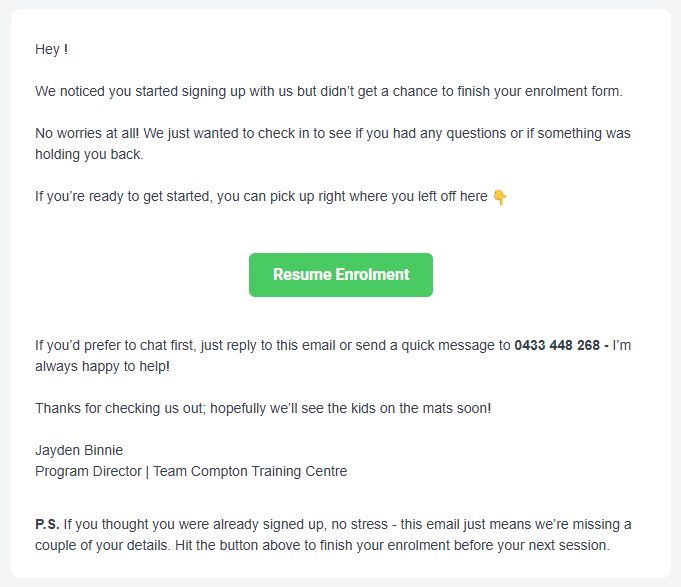
This email goes out 15 minutes after they abandon the form and again 2 days later.
It asks them to complete their enrolment.There’s a small chance that our email could end up in their spam or junk folder - remind them to check.With this follow-up system in place, most people who still aren’t in Airtable are probably intentionally avoiding signing up.Ask them to do one of the following:1) Complete their sign-up from the email they received (if they already started the process), or2) Redo their sign-up completely on the gym iPad or their phone, and show you once it’s done.
- They started signing up but got distracted before finishing the form.
- They are intentionally avoiding signing up (to skip payment or avoid filling in details).
This email goes out 15 minutes after they abandon the form and again 2 days later.
It asks them to complete their enrolment.There’s a small chance that our email could end up in their spam or junk folder - remind them to check.With this follow-up system in place, most people who still aren’t in Airtable are probably intentionally avoiding signing up.Ask them to do one of the following:1) Complete their sign-up from the email they received (if they already started the process), or2) Redo their sign-up completely on the gym iPad or their phone, and show you once it’s done.
Someone Wants a Discount or Says They Can’t Afford Training
Someone Wants a Discount or Says They Can’t Afford Training
Do not negotiate prices.You teach your members how to treat you.Offering discounts or casual deals sets a precedent that we are:
- Desperate for business
- Willing to bend rules
- Not enforcing our own policies
- Unprofessional
- Allowing members to dictate terms
A member wants to update their card or email etc
A member wants to update their card or email etc
See Operations → Updating Member Details for full instructions.
Someone Walks In Without Having Talked To Jayden (They Are Not Booked in Airtable)
Someone Walks In Without Having Talked To Jayden (They Are Not Booked in Airtable)
(They Are Not Booked in Airtable)Ask them to complete a Walk-In Form before doing anything else.